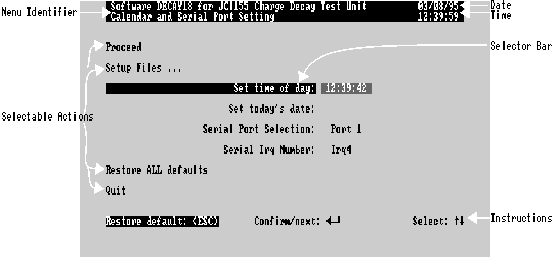
Main menu selection 4, Port / calendar / setup directory leads to the Calendar / Serial Port Menu for editing time, date and serial port settings. (The setup sub-directory can also be accessed, see Chapter 6)
Figure 7.1- Calendar and Serial Port Setting
These two items may be corrected as required. Each is divided into three fields with an appropriate delimiter between each field
Select the item required. The current setting at the instant of selection appears in an editable field. Type in a new value, and press  to confirm. For a precise time setting, type in a time say 10 secs ahead, including the seconds field, and wait till your time source indicates the time typed, then press
  .
.
When entering time or date, the initial fields only need be entered, the remaining being taken from the current time or date as displayed at top right of the menu. Thus changing the hour by one for Summer / Winter time change, just type the new hour alone then press  . Any delimiter between fields may be used, but the display will always use colons for time, slashes for dates.
The number of serial ports available is fixed by the hardware of the computer. If more than one serial port is available, this item will show an arrowhead when selected, and the other available serial port options can be chosen using  ,
,  . This item should normally only be changed if you are getting a bad link status message at the head of the main menu when the software has been newly installed, and there is some doubt about the serial port in use.
This is automatically configured to irq3 or irq4 according to computer and port selected. However this may not work on some models of computer (early PC, PC/XT, non IBM® clones), so it may be necessary to change this if all else fails. Please see Chapter 13 ("Trouble Shooting", §Serial Link Problems).