This chapter describes the extra steps required to collect and analyse charge decay data using the JCI155v4 Charge Decay Test Unit under computer control. It should be read in conjunction with the previous chapter 2.
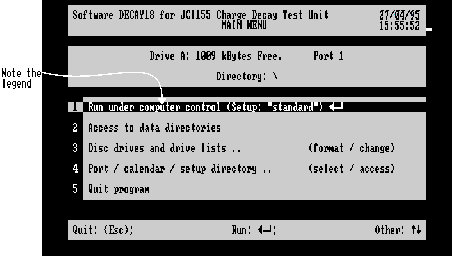
Follow the steps in chapter 2 up to the point when the main menu first appears. If all is well with the status panel information in the main menu, move the JCI155v4 mode switch to computer control. The legend in the first selection of the selection panel will then change to Run under computer control.
Figure 3.1 - Main Menu under Computer Control
To select this (if the selector bar is not already in this position), use the up arrow key  until the selector bar is on this selection, then press
  to move to the Run Parameters Menu (Figure 3.2) and then (if you do not want to make any changes there) press
  again to move to the Instrument Parameters Menu shown below.
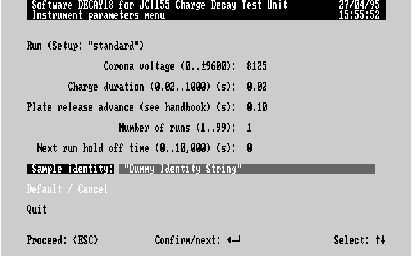
Figure 3.2 - Instrument Parameters Menu Screen
When the JCI155v4 is under computer control, the "Sample Identity Entry" is replaced by the above Instrument Parameters menu, which has additional editable items. Before proceeding, it is well to check:
Return if necessary to the Sample identity line and type in a suitable sample identity. Press  to confirm the new identity, and to return to the Run line.
Now double-check that the JCI155v4 settings are as described in the instrument manual for computer control:
and that a suitable sample e.g. paper, is in place. Then press  to start the JCI155v4 under computer control. Please wait while the charging plate is moved, the corona voltage is applied for the prescribed time, and the charging plate is released. At this point, the initial graph will appear just as in the case of manual operation (Chapter 2), and thereafter, operation is exactly the same. If the graph does not appear or fails to run, then see the Chapter 13 ("Troubleshooting", § Charge Decay Run Start Problems).
Instead of using the  to start the JCI155v4 under computer control, it may alternatively be started from the JCI155v4 instrument panel, provided the selector bar is at Run (selection 1) of the instrument parameters menu. Remote start is achieved by briefly (~1s) sliding the Mode switch one step to the left and then returning it to the Computer mode position.
Information on how to use the editable items in the instrument parameters menu to control the Corona Voltage, Charging Time, Number of runs, and Next run hold off time will be found in Chapter 10 ("Software Operation for Data Collection (Run)" §Instrument Parameters Menu).